
 This is my first Guest Article For The Blog And My Blogging Carrier Too..
First Of All Let Me Thank Mohammad Mustafa Sir to allow me to Post this article for you all. Have you ever heard about the Aweber Email Marketing Solutions ? If Not then i bet you must have seen EMail Signup Forms in Popular websites... They use Aweber. Though it is not free but it is efficient so they use that. But here In My Article I'll Let you to integrate Aweber Features and FeedBurner Features and install it on your Blog. So keep Reading And Keep Enjoying !!
What Will we Get From This ?
The main Reason why to use is because it will not only make your Blog Look Professional But Also will increase the EMail Subscriptions to your Blog. Its a modified version of the model subscribe box created by . Lets first see a demo
Add it To Blogger
You can Install This Widget Easily in your Blog By Following These Simple Steps....
Before you edit any template it's better to keep a Backup..
So First Backup your Template. Now Go To Design>Edit Html>Select Expand Widgets...
Step 1 : The CSS You Need To Search The Following Piece Of Code By Pressing [Ctrl+F]
]]></b:skin>
Now Paste The Bellow Code Just Before it.
/*
ColorBox Core Style:
The following CSS is consistent between example themes and should not be altered.
*/
#colorbox, #cboxOverlay, #cboxWrapper{position:absolute; top:0; left:0; z-index:9999; overflow:hidden;}
#cboxOverlay{position:fixed; width:100%; height:100%;}
#cboxMiddleLeft, #cboxBottomLeft{clear:left;}
#cboxContent{position:relative;}
#cboxLoadedContent{overflow:auto;}
#cboxTitle{margin:0;}
#cboxLoadingOverlay, #cboxLoadingGraphic{position:absolute; top:0; left:0; width:100%;}
#cboxPrevious, #cboxNext, #cboxClose, #cboxSlideshow{cursor:pointer;}
.cboxPhoto{float:left; margin:auto; border:0; display:block;}
.cboxIframe{width:100%; height:100%; display:block; border:0;}
/*
User Style:
Change the following styles to modify the appearance of ColorBox. They are
ordered & tabbed in a way that represents the nesting of the generated HTML.
*/
#cboxOverlay{background:#000;opacity:0.5 !important;}
#colorbox{
box-shadow:0 0 15px rgba(0,0,0,0.4);
-moz-box-shadow:0 0 15px rgba(0,0,0,0.4);
-webkit-box-shadow:0 0 15px rgba(0,0,0,0.4);
}
#cboxTopLeft{width:14px; height:14px; background:url(https://blogger.googleusercontent.com/img/b/R29vZ2xl/AVvXsEhKXezP3OvN-AAi0z4Kmnwa6nk9fUbj2skfPry9zi8lAOFZyq2kGhNQcZ7SwUo6qdgKTp9ntfnH7sGO7rdUJIFOvNYyFjW8rLUvTYAebDf5woaa38sbWetiEAu9uPLZnaJWm9IiopgBuKg/s1600/controls.png) no-repeat 0 0;}
#cboxTopCenter{height:14px; background:url(https://blogger.googleusercontent.com/img/b/R29vZ2xl/AVvXsEjXArjUmtR62C7ZSk-XrqOtM1WtCblpCKpTv7SaS3PU0vbY9O9xv0SiQYPy25PS4IaBAWzoTpD7zs3vTCRmwhBft1Jz8UUyzXrR9nIOO7q6nGitzeCE-wUQGV6DVTdyrrami7Pow1H0cEw/s400/border.png) repeat-x top left;}
#cboxTopRight{width:14px; height:14px; background:url(https://blogger.googleusercontent.com/img/b/R29vZ2xl/AVvXsEhKXezP3OvN-AAi0z4Kmnwa6nk9fUbj2skfPry9zi8lAOFZyq2kGhNQcZ7SwUo6qdgKTp9ntfnH7sGO7rdUJIFOvNYyFjW8rLUvTYAebDf5woaa38sbWetiEAu9uPLZnaJWm9IiopgBuKg/s1600/controls.png) no-repeat -36px 0;}
#cboxBottomLeft{width:14px; height:43px; background:url(https://blogger.googleusercontent.com/img/b/R29vZ2xl/AVvXsEhKXezP3OvN-AAi0z4Kmnwa6nk9fUbj2skfPry9zi8lAOFZyq2kGhNQcZ7SwUo6qdgKTp9ntfnH7sGO7rdUJIFOvNYyFjW8rLUvTYAebDf5woaa38sbWetiEAu9uPLZnaJWm9IiopgBuKg/s1600/controls.png) no-repeat 0 -32px;}
#cboxBottomCenter{height:43px; background:url(https://blogger.googleusercontent.com/img/b/R29vZ2xl/AVvXsEjXArjUmtR62C7ZSk-XrqOtM1WtCblpCKpTv7SaS3PU0vbY9O9xv0SiQYPy25PS4IaBAWzoTpD7zs3vTCRmwhBft1Jz8UUyzXrR9nIOO7q6nGitzeCE-wUQGV6DVTdyrrami7Pow1H0cEw/s400/border.png) repeat-x bottom left;}
#cboxBottomRight{width:14px; height:43px; background:url(https://blogger.googleusercontent.com/img/b/R29vZ2xl/AVvXsEhKXezP3OvN-AAi0z4Kmnwa6nk9fUbj2skfPry9zi8lAOFZyq2kGhNQcZ7SwUo6qdgKTp9ntfnH7sGO7rdUJIFOvNYyFjW8rLUvTYAebDf5woaa38sbWetiEAu9uPLZnaJWm9IiopgBuKg/s1600/controls.png) no-repeat -36px -32px;}
#cboxMiddleLeft{width:14px; background:url(https://blogger.googleusercontent.com/img/b/R29vZ2xl/AVvXsEhKXezP3OvN-AAi0z4Kmnwa6nk9fUbj2skfPry9zi8lAOFZyq2kGhNQcZ7SwUo6qdgKTp9ntfnH7sGO7rdUJIFOvNYyFjW8rLUvTYAebDf5woaa38sbWetiEAu9uPLZnaJWm9IiopgBuKg/s1600/controls.png) repeat-y -175px 0;}
#cboxMiddleRight{width:14px; background:url(https://blogger.googleusercontent.com/img/b/R29vZ2xl/AVvXsEhKXezP3OvN-AAi0z4Kmnwa6nk9fUbj2skfPry9zi8lAOFZyq2kGhNQcZ7SwUo6qdgKTp9ntfnH7sGO7rdUJIFOvNYyFjW8rLUvTYAebDf5woaa38sbWetiEAu9uPLZnaJWm9IiopgBuKg/s1600/controls.png) repeat-y -211px 0;}
#cboxContent{background:#fff; overflow:visible;}
#cboxLoadedContent{margin-bottom:5px;}
#cboxLoadingOverlay{background:url(https://blogger.googleusercontent.com/img/b/R29vZ2xl/AVvXsEhAbXrSy70wG9w9_vZqzgSSWmhPnLXfM5CtMnIOF6mLG1W1MREv105_XFdJVyWLZWCVSE13qTJ4EdM0_4miRKZSuJF1cxcrJdTyEGZNuoOaHO85rAS7n6iQmhiYMJLphsC_GBO5W6PnXcU/s400/loadingbackground.png) no-repeat center center;}
#cboxLoadingGraphic{https://blogger.googleusercontent.com/img/b/R29vZ2xl/AVvXsEgelON8k3VZ24U9s56RTfCVr7R65mxO4WaSyyCPRcFmVwcH-shy8GXsLUnMpftFU5llLN7AklXhlrbWP-acG7a2tSank6RxLJUNs_dOkSLdVcdMHxTSy2-7pKE4Gwr9HqPsrnty0Agyhv0/s400/loading.gif) no-repeat center center;}
#cboxTitle{position:absolute; bottom:-25px; left:0; text-align:center; width:100%; font-weight:bold; color:#7C7C7C;}
#cboxCurrent{position:absolute; bottom:-25px; left:58px; font-weight:bold; color:#7C7C7C;}
#cboxPrevious, #cboxNext, #cboxClose, #cboxSlideshow{position:absolute; bottom:-29px; background:url(https://blogger.googleusercontent.com/img/b/R29vZ2xl/AVvXsEhKXezP3OvN-AAi0z4Kmnwa6nk9fUbj2skfPry9zi8lAOFZyq2kGhNQcZ7SwUo6qdgKTp9ntfnH7sGO7rdUJIFOvNYyFjW8rLUvTYAebDf5woaa38sbWetiEAu9uPLZnaJWm9IiopgBuKg/s1600/controls.png) no-repeat 0px 0px; width:23px; height:23px; text-indent:-9999px;}
#cboxPrevious{left:0px; background-position: -51px -25px;}
#cboxPrevious.hover{background-position:-51px 0px;}
#cboxNext{left:27px; background-position:-75px -25px;}
#cboxNext.hover{background-position:-75px 0px;}
#cboxClose{right:0; background-position:-100px -25px;}
#cboxClose.hover{background-position:-100px 0px;}
.cboxSlideshow_on #cboxSlideshow{background-position:-125px 0px; right:27px;}
.cboxSlideshow_on #cboxSlideshow.hover{background-position:-150px 0px;}
.cboxSlideshow_off #cboxSlideshow{background-position:-150px -25px; right:27px;}
.cboxSlideshow_off #cboxSlideshow.hover{background-position:-125px 0px;}
/*-----------------------------------------------------------------------------------*/
/* box popup
/*-----------------------------------------------------------------------------------*/
#subscribe {
font: 12px/1.2 Arial,Helvetica,san-serif;
}
#subscribe a,
#subscribe a:hover,
#subscribe a:visited {
text-decoration:none;
}
.box-title {
color: #2C2D31;
font-size: 20px;
font-weight: bold;
margin: 10px 0;
text-align: center;
}
.box-tagline {
color: #999;
font-size: 14px;
margin: 0;
text-align: center;
}
#subs-container {
padding: 35px 0 30px 0;
position: relative;
}
.box-side {
width: 170px;
text-align: center;
}
.box-side.left {
padding: 0 30px 0 15px;
border-right: 1px solid #ecedf3;
}
.box-side.right {
float: right;
margin-top: -223px;
margin-right: 10px;
}
.box-icon {
width: 72px;
height: 54px;
padding: 6px 0 0 0;
margin: 0 auto;
}
.box-icon a.rss{
display: block;
width: 70px;
height: 56px;
margin: 0 auto;
}
.box-icon a{
display: block;
width: 72px;
height: 54px;
}
.box-icon a.email img,
.box-icon a.rss img {
margin: -5px 0 0;
border: 0 none;
}
.box-side h4,
.box-side h4 a {
font-size: 14px;
line-height: 14px;
color: #f26535;
font-weight: bold;
}
.box-side h4 { margin: 20px 0 10px 0; }
.box-side h5 {
font-size: 11px;
color: #5e6066;
line-height: 18px;
margin: 0 0 20px 0;
}
a.sub {
background: url("http://imgboot.com/images/cybersidh/subscribebutton.png") no-repeat scroll 0 0 transparent;
color: #996633;
display: block;
height: 44px;
line-height: 29px;
margin: 0 auto;
text-indent: -999em;
width: 130px;
}
.box-side h4 a:hover {
color: #f26535;
}
#box-or {
background: #fff;
font-size: 12px;
font-weight: bold;
height: 25px;
line-height: 25px;
margin: -115px 0 0 208px;
position: absolute;
width: 20px;
}
a:link, a:visited {
border:none;
}
.demo {
display:none;
}
Now Hit Prievew, If Every Thing Works Fine then Save The Template..
Step 2 : The Html In This Part you'll add the widget to your Blog !!
Goto :: Design>Page Elements>Add Gadget>Html/Javascript
Now Paste The Following Code In It.
<script src='http://ajax.googleapis.com/ajax/libs/jquery/1.5/jquery.min.js'></script><script src="http://sidharth12.googlecode.com/files/jquery.colorbox-min.js"></script>
<script type="text/javascript">
jQuery(document).ready(function(){
if (document.cookie.indexOf('visited=true') == -1) {
var fifteenDays = 1000*60*60*24*15;
var expires = new Date((new Date()).valueOf() + fifteenDays);
document.cookie = "visited=true;expires=" + expires.toUTCString();
$.colorbox({width:"480px", inline:true, href:"#subscribe"});
}
});
</script>
<!-- This contains the hidden content for inline calls -->
<div style='display:none'>
<div id='subscribe' style='padding:10px; background:#fff;'>
<h2 class="box-title">Never Miss Any Update From Us!</h2>
<h2 class="box-tagline">Enrich Your Inbox.[402+ Readers]</h2><br/>
<form style="border:1px solid #ccc;padding:3px;text-align:center;" action="http://feedburner.google.com/fb/a/mailverify" method="post" target="popupwindow" onsubmit="window.open('http://feedburner.google.com/fb/a/mailverify?uri=ILibrary', 'popupwindow', 'scrollbars=no,width=560,height=540');return true"><p>Enter your email address:</p><p><input type="text" style="width:140px" name="email"/></p><input type="hidden" value="ILibrary" name="uri"/><input type="hidden" name="loc" value="en_US"/><input type="submit" value="Subscribe" /><p>Delivered by <a href="http://feedburner.google.com" target="_blank">FeedBurner</a> | Powered By <a href="http://www.mybloggertricks.com">MBT</a></p></form>
<br/><h2 class="box-tagline">Subscribe us today and get Quality Articles for free.</h2>
</div>
</div>
Important :
Remove The Red Colored ILibrary With You FeedBurner ID.
Ignore The Line In Pink If Your Blog Already has JQuery.


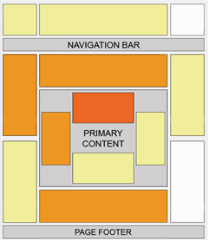 Why below post title? Because it is the position with the highest CTR (click-through rate). In other words the ad placed there will bring the most money.


